


Vibio: Share Fun, Video Chat
4.868.00 Reviews
App Specs
- Version
- 1.2.0
- Updated On
- License
- Free
- Downloads
- 50,000+
- Developer
- Akhisar Web Tasarim
- Categories
- Lifestyle
- Platform
- Android
Screenshots


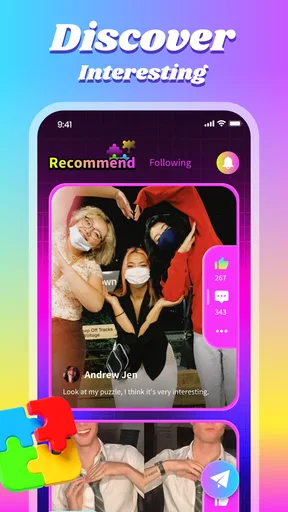


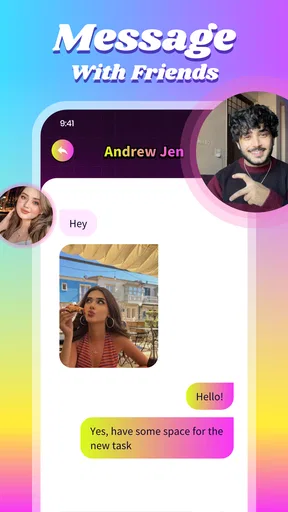
 Analysis by AppCompare
I approached Vibio: Share Fun, Video Chat as a place to meet people rather than another tool for messaging friends I already know. That distinction matters: its appeal is the possibility of lively, spontaneous conversation, while the experience depends heavily on whether you enjoy chatting with people you have not met before. I’d consider it when I’m in the mood to socialize, not when I need a dependable channel for practical plans or private conversations with close friends.
Who will get the most from a social-first app
Vibio is a lifestyle app from Akhisar Web Tasarim, and its central idea is straightforward: bring people together through conversation and shared moments. If you like discovering new voices and keeping a chat going with photos, videos, or GIFs, that mix may feel more inviting than a text-only community. The app is free to download, though in-app purchases range from $0.99 to $99.99 per item, so I’d look over any purchase prompt before deciding whether it offers something I actually want.
It is less suited to someone who wants a carefully curated feed, a professional networking space, or a quiet, predictable group chat. Social discovery always has an element of uncertainty: a room can be engaging one moment and slow the next, and a conversation with strangers may not develop into a lasting connection. I’d treat Vibio as an option for casual interaction rather than a guaranteed way to find close friends.
A realistic way to fit it into the day
Picture an evening when I have ten minutes free after dinner and don’t feel like scrolling through another feed. I could open a room, listen to the tone of the conversation, and join only if it feels comfortable. If the discussion clicks, a short video chat or a shared image can make the exchange feel more personal; if it doesn’t, I can leave rather than forcing small talk. That low-pressure approach is more useful than expecting every visit to produce a new friendship.
For a first session, I’d keep the goal modest: explore the available spaces, notice how people interact, and learn where the controls are before sharing anything personal. I would avoid sending identifying details or media I wouldn’t want beyond the immediate conversation. This is sensible on any social platform, especially one built around meeting unfamiliar people. The app is rated for teens, so younger users and their families should also think carefully about boundaries and how they want to handle conversations with strangers.
How it compares with familiar alternatives
Compared with a standard messaging app, Vibio is oriented more toward meeting people and joining conversations than keeping up with an existing contact list. Compared with a large public social network, its chat-centered approach can make interaction feel more immediate, but it may offer less value to someone who prefers to browse posts silently or follow creators. And unlike a dedicated video-calling tool, its social appeal is discovery, not simply arranging a reliable call with a particular person.
That difference shapes when I’d choose it. For a planned family call, I’d use a familiar calling app; for a focused interest discussion, I might prefer a specialist community with clear topic organization. Vibio makes more sense when I’m open to a casual conversation and happy to see where it goes. A useful personal rule is to decide before opening it whether I’m looking to browse, talk, or share media, then leave once I’ve had the interaction I wanted. That keeps spontaneous social time from turning into aimless app-hopping.
Worth Reading Before You Choose

Flipboard Shows What News Apps Must Do Beyond the Feed

Switching to Android Auto Means Rethinking Your Driving Routine

Google Calendar Makes a Crowded Week Easier to Manage

Ludo King Makes the Most of the Minutes Between Plans

Baby Panda World Brings Quick Play to Modern Phones, but Its Game Library Feels Busy

ESPN’s Live Game View Makes Following Close Games Easier
Get Ready to Dive Into the Vibio Experience
First things first, Vibio is super easy to get started with. From the moment you download it, you're greeted with a sleek and intuitive interface. No complicated menus or confusing setups here. It's all about getting you connected and having fun as quickly as possible. Trust me, you won't be scratching your head trying to figure out how to use it.
Once you're in, the world is your oyster. You can hop into various chat rooms or start your own. Whether you want to engage in deep conversations or just share a laugh with random strangers, there's a space for you on Vibio. It's like a virtual coffee shop where everyone is just a click away.
Features That Keep You Hooked
Now, let's talk features. One of the standout aspects of Vibio is the video chat functionality. It doesn't matter if you're on Wi-Fi or cellular data; the video quality holds up remarkably well. I'm talking about clear, crisp video with minimal lag – just what you need for a seamless chatting experience.
But wait, there's more! Vibio lets you share fun moments in real-time with its integrated media sharing options. You can send photos, videos, or even GIFs to spice up your conversations. It's a fantastic way to keep things lively and engaging. Plus, with the app's robust privacy settings, you can control who sees what, ensuring your chats remain secure.
Why Vibio Stands Out in the Crowd
In a world filled with communication apps, what makes Vibio unique? For starters, it's not just about chatting – it's about creating connections and sharing experiences. The app fosters a sense of community that I haven't seen elsewhere. You can join groups based on your interests, whether it's gaming, cooking, or just sharing memes. It's a melting pot of fun and interaction.
Moreover, the app's developers are continually rolling out updates to improve user experience. From new features to enhanced security measures, they're committed to making Vibio the go-to app for anyone looking to share fun and make new friends. It's refreshing to see an app that's not just resting on its laurels but actively listening to its user base.
What the current release tells me
The release timeline gives a useful snapshot of where the product stands: Vibio arrived on November 23, 2025, and the current version is 1.1.6. That is enough to identify the build a new user is likely to encounter, but not enough to make claims about a detailed feature-by-feature history. I would separate those two things rather than assume every improvement mentioned in a general description belongs to this particular version.
For someone already using the app, the practical question is whether the current build keeps the everyday basics comfortable: finding a room, following a conversation, and sharing something without interrupting the flow. If an update changes how a familiar control works, it can be worth taking a moment to recheck the interface before starting a live chat. That small habit is especially useful in a social app, where fumbling with settings mid-conversation can be awkward.
Small habits that make conversations easier
I’d treat a room as a conversation with its own rhythm, not as a queue of people to contact. Spend a little time reading the mood before jumping in; a light exchange may not be the right place for a serious subject, and a focused discussion can lose its thread if messages veer too far away. This is a simple way to improve the odds of a pleasant interaction without expecting the app to do the social work for you.
Media sharing is best used with a little intention. A photo or GIF can break an awkward pause or give a group something specific to react to, but sending several items in a row can crowd out the conversation. I’d share one relevant thing, see how people respond, and keep the exchange balanced. For video, I’d also consider the setting I’m in and whether I’m comfortable being on camera before joining; a text exchange is the better choice when I’m in a public place or simply don’t feel camera-ready.
Privacy deserves a careful, practical read
Privacy controls are useful only when I understand what they control, so I wouldn’t assume that one setting makes every interaction private. Before sharing media, I’d check the audience and avoid including location clues, personal documents, or details that identify where I live or work. If a conversation turns uncomfortable, I’d step away rather than feeling obliged to explain or continue. Those are not reasons to avoid social apps altogether; they are sensible boundaries for any service that connects strangers.
Because Vibio is rated Teen, it may appeal to younger people, but the label shouldn’t replace an individual judgment about readiness. Families can talk through what information is safe to share, how to respond to unwanted contact, and when to leave a room. I’d also recommend trying the app in a shared, low-stakes setting first instead of treating a first conversation as a private confidant relationship. That gives a new user a chance to understand the social atmosphere before investing more time.
What I’d check before spending or settling in
The free entry point makes it possible to see whether the social format suits you before paying, which is the sensible order. Since optional purchases can vary widely in price, I’d pause at each offer and ask whether it solves a real need or simply promises more of the same experience. A purchase is easiest to regret when it is made during a moment of excitement, so I’d avoid buying anything just to keep up with a conversation or feel more included.
The app has a 4.8 average from 496 ratings, with 21 written reviews and over 10K installs. Those figures suggest a positive reception among people who have rated it, but they can’t tell me whether a particular room will be active at the time I open the app or whether I’ll click with its users. I use ratings as a reason to investigate, not as a guarantee that the community will match my interests.
Where expectations should stay modest
The strongest limitation is also part of the format: conversation quality relies on other people being present, interested, and respectful. A polished interface cannot ensure a lively room, and video chat can feel less comfortable than text for users who prefer time to think before replying. If you want a consistent schedule, searchable specialist advice, or a stable group of known contacts, a dedicated community or conventional messenger is likely to serve you better.
I’d also be cautious about assuming that a broad social space will automatically provide meaningful connections. Meeting someone new takes patience, and one quiet session says little about how the app will feel on another day. Conversely, a fun first chat is not a reason to share private information quickly. The best approach is to enjoy the spontaneous side while keeping expectations and boundaries realistic.
Final Thoughts: Should You Try Vibio?
If you're looking for an app that combines the best of both worlds – video chatting and social interaction – then Vibio is definitely worth a try. It's an app that doesn't take itself too seriously, and that's what makes it so enjoyable. Whether you're looking to make new friends or just have a good time, Vibio has got you covered.
So, what are you waiting for? Dive into the world of Vibio: Share Fun, Video Chat and discover a new way to connect, laugh, and share. It's an experience you won't want to miss, and who knows? You might just find your new favorite app.
My recommendation in one sentence
I’d try Vibio if casual discovery sounds fun, keep my first conversations light, and decide after a few visits whether its rooms and video-first social style suit me. The app is free, supports devices running Android 6.0 or later, and sits in the lifestyle category; the developer is Akhisar Web Tasarim. That makes the basic decision easy, but the lasting value is personal: it comes down to whether you enjoy meeting people this way.
What I would watch as it develops
Going forward, I’d pay attention to whether new releases make it easier to understand room activity, manage who can reach me, and share media without adding friction. Those are the areas that matter most to the experience described here. Until a specific change is established, I’d treat them as things worth watching rather than promises about what a future version will contain.
Pros
- User-friendly interface makes navigation easy.
- High-quality video chat for clear communication.
- Wide range of fun filters to enhance chats.
- Quick and seamless connection with new friends.
- Secure platform with strong privacy measures.
Cons
- Occasional lag in video calls during peak times.
- Limited customization options for profiles.
- Some features require in-app purchases.
- Ads can be intrusive during free usage.
- Battery consumption is relatively high.
FAQs for Vibio: Share Fun, Video Chat
What is Vibio: Share Fun, Video Chat, and how does it work?
Vibio is a social networking app designed for video chatting and sharing fun moments with friends and family. It allows users to connect through live video calls, exchange messages, and participate in group chats. The app focuses on ease of use and offers various interactive features to enhance communication and engagement.
Is Vibio free to use, or does it require a subscription?
Vibio is free to download and use, offering a range of features without any cost. However, it may include optional in-app purchases or premium subscriptions that provide additional features or remove ads. Users can enjoy the core functionalities without subscribing to any paid plans.
What are the main features of Vibio?
Vibio offers several main features, including high-quality video calls, group chats, and fun filters to enhance conversations. Users can share videos, photos, and emojis to make interactions more engaging. The app also prioritizes user privacy and security, ensuring that all communications are encrypted and safe.
Is Vibio safe for children to use?
Vibio is designed for a broad audience, but parental guidance is advised for younger users. The app includes privacy settings to control who can contact or view your profile. Parents should review these settings and discuss online safety with their children to ensure a secure experience.
What devices and operating systems are compatible with Vibio?
Vibio is compatible with both Android and iOS devices. It requires Android version 5.0 and up or iOS 10.0 or later. The app is optimized for smartphones and tablets, ensuring a smooth user experience across different devices and screen sizes.


